Elevate Your Paper Crafts with Precision Decorative Bookmark Papercut Designs
There is a distinct satisfaction in sliding a handmade marker between the pages of a good book. It personalizes the reading experience and serves as a tangible reminder of a story well told. For crafters, the decorative bookmark papercut has become a staple project, blending artistic expression with functional utility. Whether you are a hobbyist looking to gift something unique or an entrepreneur aiming to expand your product line at local markets, these intricate designs offer endless possibilities. However, the journey from a digital file to a flawless physical object is often fraught with small pitfalls that can compromise the final result. Understanding the nuances of working with cutting files is just as important as having the design itself.
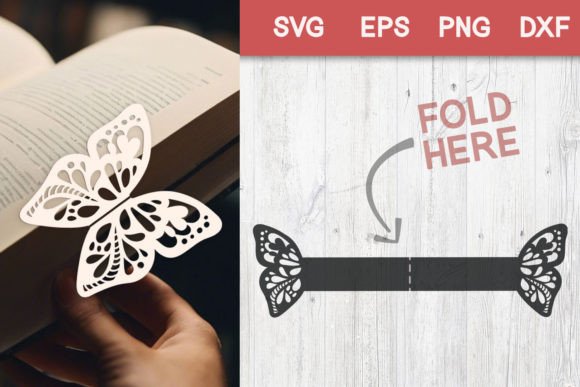
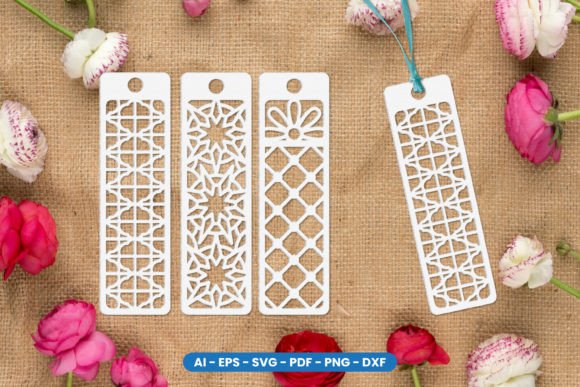
At its core, a decorative bookmark papercut involves removing specific areas of paper to create a lace-like pattern or a detailed silhouette. These are not merely printed images; they are structural elements that rely on the integrity of the remaining paper. When you purchase a bundle containing SVG, AI, EPS, PNG, PDF, and DXF files, you are acquiring the blueprint for this structure. The versatility of these formats allows them to be used across various platforms, from consumer-grade machines like Cricut and Silhouette to professional laser cutters. Yet, many creators rush into the cutting process without fully evaluating their material choices or machine settings, leading to torn bridges, incomplete cuts, or fragile structures that fall apart upon first use.
Choosing the Right Material for Structural Integrity
One of the most common misunderstandings beginners face is assuming that any paper will suffice for a papercut bookmark. While standard printer paper might work for a simple shape, it lacks the tensile strength required for intricate decorative bookmark papercut designs. If the negative space is too dense or the connecting lines (bridges) are too thin, lightweight paper will tear easily when the user pulls the bookmark from between pages. This results in a product that looks unfinished and frustrates the end-user.
To avoid this, shift your focus to cardstock with a weight between 65lb and 80lb (approximately 176–216 gsm). This range provides enough stiffness to hold the delicate details while remaining flexible enough to slide smoothly into a book. Additionally, consider the grain direction of the paper. Cutting against the grain can cause rough edges or make the paper more prone to splitting along the fibers. A better approach is to test a single cut on a scrap piece of your intended material before committing to a full sheet. This simple step saves material and ensures that the intricate loops and curves of your design remain intact.
Navigating File Formats and Machine Compatibility
When you download a comprehensive pack featuring SVG, AI, CS6, EPS, High Quality PNG, PDF, and DXF files, it can be tempting to grab the first format that opens in your software. However, choosing the wrong file type for your specific workflow can lead to scaling issues or lost detail. For instance, using a raster-based PNG for a cut project is a significant error. PNGs are pixel-based; if you scale them up or down significantly, the cutting machine may interpret the jagged pixel edges as part of the cut path, resulting in a rough, uneven outline.
For vinyl cutters and die-cutting machines, vector files like SVG or DXF are superior because they use mathematical paths to define shapes, ensuring crisp lines regardless of size. If you are using Adobe Illustrator for further customization or professional print preparation, the AI or EPS files offer the highest editability. A frequent mistake occurs when users open an SVG in a program that automatically groups layers incorrectly, causing the machine to cut the outer frame before the inner details, which can shift the paper. Always ungroup your elements and check the cut order in your software. Ensure that "weld" or "unite" functions are applied where necessary to prevent the machine from treating connected parts as separate objects.
The Importance of Weeding and Assembly Techniques
Even with perfect settings and materials, the post-cutting phase—often called weeding—can make or break your project. With complex decorative bookmark papercut patterns, the removed pieces can be tiny and stubborn. A common error is trying to weed the paper immediately after cutting while it is still warm from the blade friction or tightly adhered to the mat. This often leads to ripping the very bridges you need to keep.
A more effective method is to let the mat sit for a minute after cutting to allow the paper to cool and relax. Use a dedicated weeding tool with a fine, sharp tip to gently lift the corners of the waste material. If a piece refuses to budge, do not force it; instead, re-run a "partial cut" on your machine with slightly increased pressure just for that specific layer. Furthermore, many designers overlook the potential of layering. A single-color bookmark is elegant, but sandwiching a translucent vellum layer between two cardstock cuts can add depth and a stained-glass effect. When attempting this, ensure your adhesive is applied sparingly. Excess glue can seep into the delicate cutouts, creating unsightly bumps and stiffening the bookmark so much that it damages the book's spine.
Optimizing for Small Business and Gifting
For those looking to sell these items or use them as branded marketing tools, consistency is key. A mistake often seen among new sellers is inconsistent sizing. If one batch of bookmarks is slightly larger than another due to improper scaling of the PDF or SVG file, it signals a lack of quality control to the customer. Always set your document dimensions to the exact finished size of the bookmark before importing your cut file. Standard bookmark sizes usually range from 2 inches by 6 inches to 2.5 inches by 7 inches, but sticking to a uniform size within a collection creates a more professional presentation.
Additionally, consider the packaging. Because papercut bookmarks are delicate, tossing them into a loose envelope can result in bent corners or crushed details by the time they reach the buyer. Investing in rigid mailers or backing the bookmarks with a sturdy card before packaging protects the investment and enhances the unboxing experience. This attention to detail reflects well on your brand and encourages repeat business.
Final Checks Before You Cut
Before you hit the "make" button, take a moment to review your digital canvas. Zoom in to 400% or higher to inspect the nodes and paths. Are there any stray points? Are the lines truly closed? Open paths can cause the machine to cut endlessly or miss sections entirely. Verify that your mirror setting is off unless you are working with iron-on vinyl. Finally, ensure your blade is sharp. A dull blade drags through paper rather than slicing it, leading to frayed edges that ruin the aesthetic of a decorative bookmark papercut.
By paying attention to these details—material selection, file format logic, weeding patience, and quality control—you transform a simple digital download into a high-quality physical product. The files you acquire are powerful tools, but their potential is only realized through careful execution. Whether you are crafting for joy or profit, taking the time to refine your process ensures that every bookmark you create is durable, beautiful, and ready to mark the page of a cherished story.